Reading support from Grade R to Grade 3

Every child clicks differently.

The practice companion that works alongside any school phonics programme: structured, fun and built on three pillars, so children become confident readers. Grade R to Grade 3, made by a speech-language therapist and mom.

Already have the app? Open my app. On a new phone, tablet or computer, open it and enter your email and unlock code in the Grown-up corner.

Watch it click
snail
s · n · ai · l → snail
Read itWrite itThink it

Not another phonics programme. The practice that makes any programme stick.

Your child learns to read at school. Click Confident gives them structured, fun, daily practice (read it, write it, think it) so what they’ve been taught turns into confident reading, spelling and understanding. It works alongside Jolly Phonics, Time2Read, THRASS, Letterland or whatever your school uses.

Click Confident is

  • Daily practice that matches what your child is learning at school
  • Reading, spelling and understanding in every session
  • Short, fun and confidence-building, with no wrong-answer buzzers
  • Built by a speech-language therapist and mom

Click Confident isn’t

  • A replacement for your school’s reading programme
  • A diagnosis or assessment tool
  • A substitute for therapy or learning support

Does this sound like your child?

Click Confident was built for exactly these moments.

“They guess words from the first letter or the picture.”Sound buttons show which letters work together, so children blend every sound instead of guessing.
“They can read words, but sentences fall apart.”Decodable stories, timed re-reads and new passages build smooth reading of connected text.
“They read it, then can’t tell me what it was about.”Every session ends with Think it and Talk it: questions, retelling and word meanings.
“Spelling just doesn’t stick.”Spelling in every session, plus heart words that come back on a schedule until they’re known.
“They learn a sound one week and forget it the next.”A daily warm-up brings back earlier sounds and your child’s own tricky words, and end-of-unit checks show what to practise.
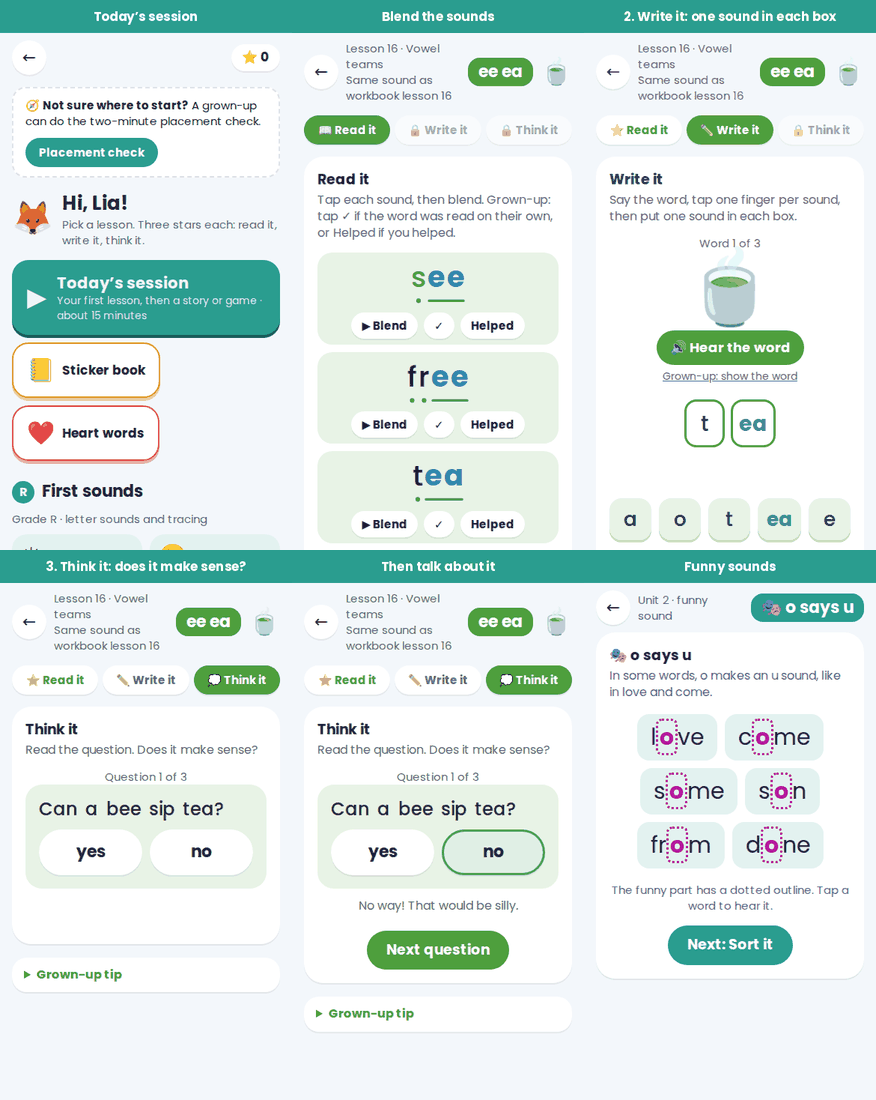
An animated demo of a Click Confident lesson: reading with sound buttons, spelling in sound boxes, a thinking question, heart words in sentences and funny sounds.

See a lesson in action

Read it with sound buttons, write it one sound in each box, then think and talk about it. Heart words and “funny sounds” get their own practice too.

Try the free taste What we practise, in order

Three pillars, every time

Reading clicks when a child can sound a word out, spell it and think and talk about what it means. Every Click Confident session builds all three, and there are no wrong-answer buzzers, because confidence is part of the evidence.

Read it

Sound buttons show which letters work together, so children blend instead of guess. Made-up “alien words” prove the skill is real.

Write it

Spelling in every session. One sound in each box, so children learn that two or three letters can make one sound, and that spelling is reading in reverse.

Think it and Talk it

Silly questions check understanding, then talk builds oral language: explaining why, retelling stories and exploring what words mean.

The third pillar is what gives reading its meaning

A child who can sound out every word and spell it perfectly, but can’t explain what it means, predict what happens next or talk about why a character did something, isn’t really reading yet. Decoding and spelling are the tools; thinking and talking about what was read is the point.

That’s why every Click Confident session ends with Think it: silly questions that check understanding, then talk that builds the thinking language reading depends on, like explaining why, retelling in order, exploring word meanings and noticing what makes sense. In Click Confident, it’s never skipped.

What I offer

Use them on their own or together. Every app lesson matches a workbook lesson, with new words and stories, so practice stays fresh.

Workbook

Click Confident Phonics Workbook

173 pages for Grades 1–3, plus a separate 43-page Grade R First Sounds workbook full of letter tracing.

  • 51 step-by-step lessons in ten units, including Grade 2–3 word-building
  • 29 funny decodable stories and 20 word searches
  • 10 timed re-reads, end-of-unit checks and a progress log
  • 104 heart words and a placement check
  • Digital: print at home, or write on it with a stylus on a tablet
App

Click Confident Phonics App

The same sounds as the workbook, made interactive.

  • Free taste: try Grade R first sounds and lessons from Unit 1 and Unit 5
  • Grade R Sound Buddies: grow a buddy over 5 practice days, with lots of finger tracing
  • Sound Detectives and Sound Wizards: optional listening games with picture answers, in Anni’s voice
  • Through to prefixes and suffixes by Grade 3
  • Read it, Write it, Think it in every session, with a daily warm-up
  • Heart words reviewed on a schedule until they stick, plus “funny sounds”
  • End-of-unit checks that reteach what was missed
  • Reports that separate accuracy, fluency and comprehension, with a CSV export for teachers and therapists
Coming soon

Decodable chapter books

Real stories children can read on their own, matched to the sounds they have learnt.

  • Written to the same sound sequence as the workbook
  • Funny, chapter-length stories that build stamina
  • Join the list to hear first when they launch
One to one

A reading app made for your child

An individually tailored literacy mini-app, built around your child’s exact next steps.

  • Starts with a detailed parent intake and reading check
  • Uses your child’s own words, interests and goals
  • Limited places each term

Prices

Once-off prices in South African rand. No subscriptions: the app is yours for life, and the workbooks are digital PDFs to print at home or use on a tablet. Prices are for one family, with up to 4 children.

Best value · everything

Family Pass

R449

The full app plus both workbooks (Grade R First Sounds and Grades 1–3), for up to 4 children. Once-off, with free app updates.

Order
App

App only

R299

Lifetime unlock of every lesson, story, game, check and progress report, Grade R to 3.

Order
Workbook

Grades 1–3 workbook

R169

The 173-page digital workbook. Print it at home, or write on it with a stylus.

Order
Workbook

Grade R workbook

R99

First Sounds: 43 pages of letter sounds and tracing. Print it, or trace on a tablet.

Order
For schools & practices

Teacher & therapist licence

Let’s talk

For a whole class or a therapy caseload: the app for more learners, and the workbooks for classroom or practice use.

Contact me

Digital, so you choose how to use it: print the workbooks at home, or open them on a tablet, Chromebook or touch-screen laptop and write on the pages with a stylus or finger. It saves printing costs and paper, and most children love it. Pay online, or order and I’ll email the payment details. Once paid, you receive your workbooks and app code by email, usually the same day.

AL
About me

Hi, I’m Anni.

I wasn’t looking for another reading programme. I was looking for good practice to use alongside the one my children already had, and I couldn’t find it.

I’m a speech-language therapist by training and a mom of three children who each experience barriers to learning in their own way. I’ve spent the past decade advocating for my intelligent, funny, wired-differently children, and along the way I decided: if it isn’t available, create it.

With clinical experience in literacy and early intervention, I started Click Confident because I kept meeting bright children who believed they were “bad at reading” or “couldn’t spell”, when what they really needed was a clearer path and easy opportunities to practise, practise, practise.

Everything I make follows the same principles: teach one step at a time, practise reading, spelling and meaning together, and never make a child feel wrong for trying. Mistakes are information, not failure.

Reading doesn’t click for every child in the same way or at the same time. That’s the whole point.

Anni Lotz

Questions parents ask

Why the Fredoka font?

Fredoka has clear, rounded letters with a single-storey a and g, the shapes children learn to write, so what they read matches what they write. It isn’t a specialist font: research hasn’t found that special fonts improve reading. Clear print, good spacing and explicit teaching are what help.

Why do colours mark sounds, not tint the page?

Colour only ever marks letters that work together to make one sound, so attention stays on the link between letters and sounds. Pages aren’t tinted by default, because studies haven’t shown that coloured overlays improve reading for most children. Some children find a tint more comfortable, so the app includes an optional colour overlay in Reading settings, along with a choice of fonts, extra word spacing and a reading tracker.

What are Sound Detectives and Sound Wizards?

Optional listening games, 3 to 5 minutes, that practise hearing sounds in spoken words: first, last and middle sounds, blending “robot talk”, counting sounds, then taking away, adding and swapping sounds. Children tap pictures to answer, so there’s no reading and no microphone. They support phonics rather than replace it. A printable book with the same games is available for grown-up-led practice.

Why short sessions every day?

Practice spread over days sticks better than long, occasional sessions, and short sessions end before attention and confidence dip. Aim for 10 to 15 minutes most days.

Why ask questions and talk about stories?

Reading is two skills working together: working out the words and understanding language. Explaining, retelling and talking about what words mean build the language that comprehension depends on.

How do I get and use an unlock code for the full app?

Choose the Family Pass or the app under Prices and send the order form. I’ll email you the payment details, and once your payment reflects I’ll email your personal unlock code, which looks like CC-ABCD-1234. To use it, open the app, tap Grown-up corner at the bottom of the first screen, answer the sum, then type your email and code under Full app and tap Unlock. The code is yours for life and works on all your family’s devices. Lost it? Just email me and I’ll resend it.

What happens if I change devices or browsers?

The app saves progress and your unlock on the device and browser you use, not online, which keeps your child’s information private. On a new device or a different browser, open the app and enter your email and unlock code again; it takes a minute. To bring your child’s progress across, go to Grown-up corner on the old device, tap Backup next to their name, and send the code to yourself (WhatsApp or email works). On the new device, paste it into Restore from a backup code. Clearing your browser’s history or data also clears the app, so make a backup now and then.

Can I install the app on my computer, tablet or phone?

Yes, straight from this website, with no app store needed. Computer (Chrome or Edge): open the app and click the install icon at the right of the address bar, or open the browser menu and choose Install Click Confident. It opens in its own window and you can pin it to your taskbar. Mac (Safari): File, then Add to Dock. iPhone or iPad (Safari): tap Share, then Add to Home Screen. Android (Chrome): tap the ⋮ menu, then Install app. Once installed, it works without internet. On iPhones and iPads the home-screen app keeps its own progress, so enter your unlock code there once and use a backup code to move progress across.

Is Click Confident a phonics programme?

No. It’s a practice companion. Your child learns to read through their school’s programme, whether that’s Jolly Phonics, Time2Read, THRASS, Letterland or another. Click Confident gives them short, structured, fun practice at home in all three pillars (reading, spelling and understanding) so what they’ve been taught turns into confident reading. It follows the order most phonics programmes teach in, so it’s easy to match.

What does Click Confident practise, and in what order?

See what we practise, in order: every sound, spelling pattern, heart word and funny sound, unit by unit, and how each is practised, reviewed and checked. You can also download it as a PDF to share with your child’s teacher or therapist.

Can my child use the workbook on a tablet instead of printing?

Yes. The workbooks are PDFs, so you can open them in a free app that lets you write on PDFs and use a stylus or a finger to trace, circle and write on the pages. On an iPad, try Goodnotes or Notability; on Android, Chromebooks and Windows touch-screens, apps such as Xodo or Adobe Acrobat Reader work well. It saves on printing and paper, and children usually love it. Many parents mix both: tablet for tracing practice, printed pages for longer writing.

Can teachers or therapists use Click Confident?

Yes, with a licence. The standard prices are for one family: the app works for up to 4 children, and the workbook is for use at home. Teachers, remedial teachers and therapists who want to use Click Confident with a class or caseload can get a teacher and therapist licence, which covers more learners and classroom or practice use. Get in touch and we’ll find the right fit.

How will I know if it’s working?

Every unit has a timed re-read that measures words correct per minute, and the app keeps a log of minutes, reading accuracy and spelling, with a report you can print for a teacher or assessor. If progress stalls on one level, it flags it for you so you can check oral language and consider an assessment. It never diagnoses.
Get in touch

Let’s talk reading

Ordering a workbook, joining the book waiting list or asking about a tailored app? Send a message and I’ll reply by email.

Email: clickconfidentcc@gmail.com